GS1
GS1 is an international non-profit organization that develops and maintains global standards for identifying, collecting, and sharing data throughout supply chains. Many companies in the food and cosmetics industries are members of GS1.
Among these standards is the GDSN (Global Data Synchronization Network), which structures the exchange of information between players in the chain. This system specifies both the data expected (such as the net weight of a product) and its format (expressed, for example, in grams), which makes exchanges more reliable and saves time. Thanks to this standardization, data flows can be centralized and simplified.
GS1, formerly known as Gencod, acts as a common reference point by certifying the data sources of its members. Present on an international scale (European Union, United States, etc.), it brings together a large network of players, particularly in the agri-food and cosmetics industries.
The barcode identification system (EAN 13, 14, 15) is an essential component of this ecosystem, based on the principle of uniqueness: a unique GTIN/EAN code corresponds to a unique product.
The beCPG solution has integrated GS1 fields into its product repository to facilitate information exchange, while ensuring greater reliability and significant time savings in data management.
GS1 Data
The finished product fields are used to define the five levels of the GS1 logistics hierarchy.
- The product, the EAN code and the Packaging section of the product are filled in
- The innner packaging, the EAN code in packaging and the In packaging section of the product are filled in, the field Number of product / in packaging indicates the number of products in the packaging pack:palletProductsPerInnerPack
- The case, the parcel EAN code is filled in, the logistics unit section is filled in. The packaging list allows you to indicate the number of products in the package or manually by entering (Number of products / package)
- The pallet, the pallet EAN code is filled in, the palletization section is filled in. The number of packages per pallet comes from the pallet kit or is entered manually (Number of packages / pallet)
- Transportation, the business unit type field is Transportation unit
When it is not possible to define all the logistics levels on a single product, it is necessary to create logistics variants. A logistics variant is a finished product where the field type of business unit is different from empty or Consumer unit - Basic unit.
The type of business unit field allows you to choose the type of logistics hierarchy described in the logistics variant. The business data applies to the type of business unit selected or to all if nothing is selected.
When a business unit type is selected the following default values apply to the other logistics levels defined in the product:
- Billable Unit: No
- Controllable unit: No
- Consumer Unit: No
- Is a service: No
Example of a typical logistics setup:
| Type | Description | Attributs |
|---|---|---|
 EACH EACH |
The EAN code of the product is entered. The Packaging/Packaging section of the product is used to describe the packaging of the unit. Type of commercial unit: Consumer unit - Basic unit (optional) |
EAN: bcpg:eanCode Type of packaging / packaging: gs1:packagingTypeCode Height (mm): gs1:depth Width (mm): gs1:width Depth (mm): gs1:height Net Weight (kg): bcpg:netWeight Net Weight drained (kg): bcpg:drainedWeight Gross weight (kg): gs1:weight |
 INNER_PACK INNER_PACK |
Type of trade unit: Consumer batch - Homogeneous or heterogeneous logistics sub-packaging (optional) | EAN inner pack: gs1:innerPackEanCode Depth (mm): gs1:innerPackDepth Width (mm): gs1:innerPackWidth Height Pallet (mm): gs1:innerPackHeight SC Net Weight (kg): gs1:innerPackNetWeight SC Gross Weight (kg): gs1:innerPackWeight |
 CASE CASE |
The package EAN of the product is filled in. The Packaging/Logistics unit section of the product is used to describe the packaging of the unit. Type of trade unit: Standard homogeneous package (optional) |
EAN case: bcpg:eanCodeLevel2 Type of logistics unit: gs1:secondaryPackagingTypeCode Depth (mm): gs1:secondaryDepth Width (mm): gs1:secondaryWidth Height (mm): gs1:secondaryHeight Package net weight (kg): gs1:secondaryNetWeight Weight gross package(kg)::secondaryWeight |
 MIXED_CASE MIXED_CASE |
Requires creating a logistics variant composed of several finished products Type of business unit: Standard heterogeneous package (mandatory) |
|
 PALLET PALLET |
The EAN Palette of the product is filled in. The Product Packaging/Palletization section describes the palletization of the unit. Type of commercial unit: Pallet - standard homogeneous pallet box (optional) |
EAN pallet: bcpg:eanCodeLevel3 Depth (mm): gs1:tertiaryDepth Width (mm): gs1:tertiaryWidth Pallet height (mm): pack:palletHeight Pallet net weight (kg): gs1:tertiaryNetWeight Gross pallet weight (kg): gs1:tertiaryWeight Type of pallet support:** gs1:palletTypeCode |
 MIXED_PALLET MIXED_PALLET |
Requires creating a logistics variant composed of several finished products Type of business unit: Pallet - standard heterogeneous pallet box (mandatory) |
|
 DISPLAY_SHIPPER DISPLAY_SHIPPER |
Requires creating a logistics variant composed of several finished products Type of commercial unit: Pallet - standard heterogeneous pallet box (mandatory) Filled display: Yes (mandatory) |
hasDisplayReadyPackaging, DisplayTypeCode: Shelf Display / Floor Display |
 CASE OF EACH CASE OF EACH |
The EAN code of the product is entered: it contains the EAN code of the package |
In order to represent the five levels of the supply chain in beCPG, it is good practice to start with the smallest possible product and then work your way up using it as a component for the higher level product. Compared to the example above, we first define the consumer-level unit, then a pack-type product itself composed of several basic products, and so on up to the pallets.
GS1 Standard Fields
GS1 fields specific to certain types of products (alcoholic beverages, cheese, organic products, seasonal products, etc.) are available in beCPG. They can be added via aspects, which prevents cluttering the display of products that are not concerned. For more information, click here.
Logistics Unit
In beCPG, the Logistics Unit entity allows you to configure different assemblies from the same finished product as Logistics Variants. It is used in particular to distinguish elements such as packaging type, EAN codes, or certain logistics properties.
A Logistics Variant corresponds to a specific version of a product or offer, differentiated by elements related to logistics—most often packaging—without modifying the product itself.
It is also possible to manage VAs (promotional products), which correspond to promotional products launched on an ad hoc basis as part of specific offers.

Product-Specific Fields
GS1 mandatory attributes catalog
GS1 mandatory attributes completion can be traced on a dedicated catalog, available on "Progression" tab in the product.
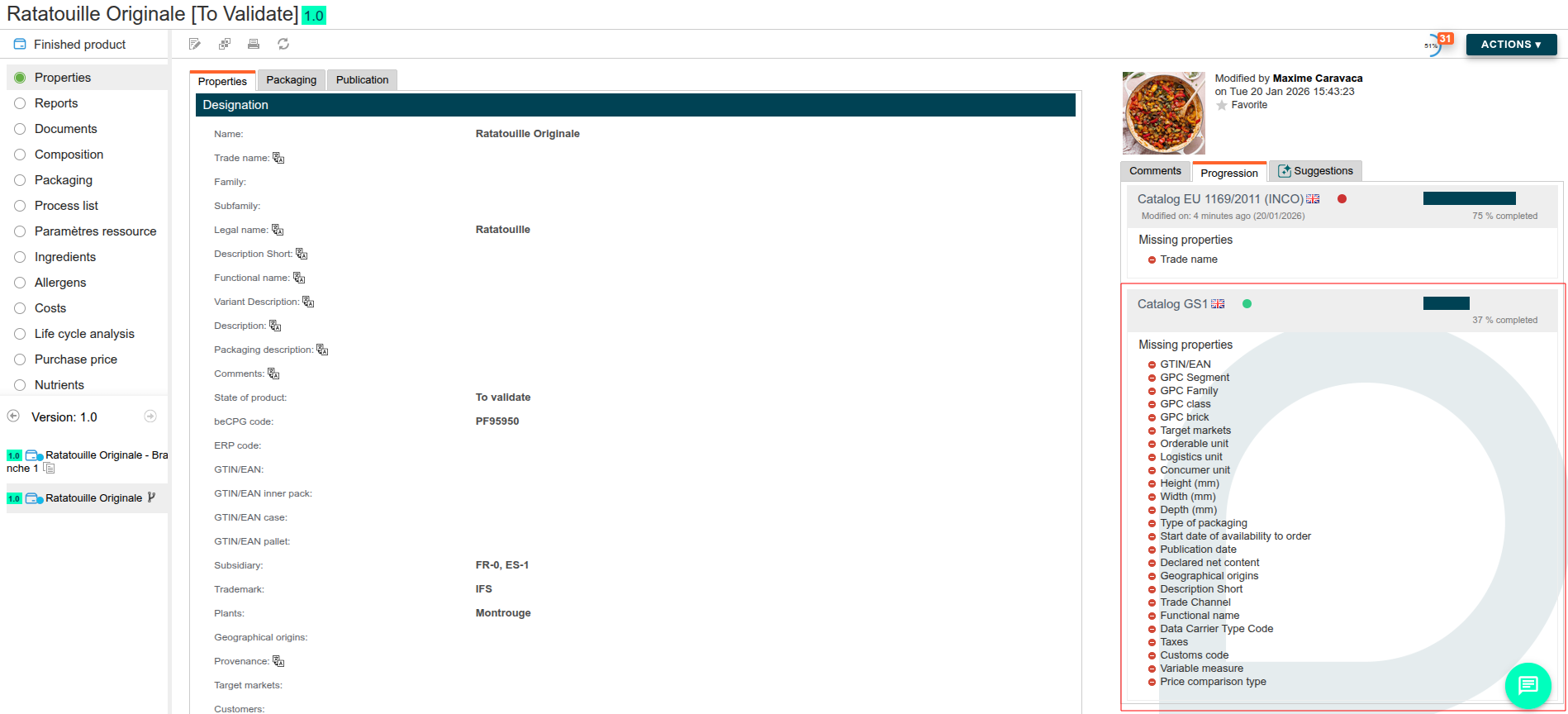
Each mandatory attributes are listed here and their completion are identified as prerequisites for the product to be successfully send throught the GS1 connector.
Alcoholic Beverages
For alcoholic beverages, add the Alcoholic Beverages aspect to the product. The following fields become available:
- Alcohol content: alcohol percentage by volume
- Vintage: harvest year (for wines)
- Wine origin: GS1 origin code
- Producer: producer or merchant name
- Beer style: for beers only
- Color / Sweetness: organoleptic characteristics
Cheese
For cheese products, add the Cheese aspect. Available fields include:
- Fat / Dry matter: fat percentage in dry matter
- Edible rind: yes / no / not applicable
- Rennet type: animal, vegetable, microbial, etc.
- Ripening period: duration in days
- Ripening description: free text
Seafood Products
For seafood products, the following fields allow you to enter traceability information:
- Fish species: species name according to FAO nomenclature
- Catch area: FAO area code
- Catch method: trawl, line, net, etc.
- Production method: fishing or farming
- Storage state: fresh, frozen, chilled
Tip: For finished products containing fish, fishing information is automatically retrieved from the raw materials in the composition list.
Organic Products
Organic information is retrieved from the product's claim list. For a product to be exported as organic, add a claim with a code containing "ORGANIC" (e.g., EU_ORGANIC, US_ORGANIC). Associated fields are:
- % Organic: percentage of organic ingredients (claim field)
- Certification: association to a certification (on the claim or on the Plant)
- Place of farming: field
gs1:organicProductPlaceOfFarmingCodeon the product (e.g., EU_AGRICULTURE)
The associated organic certification contains:
- Certificate number: certificate identifier
- Certifying body: name of the organization (e.g., Ecocert)
- Standard: standard code (e.g.,
EU_ORGANIC_FARMING) - Place of farming: production origin (e.g., EU Agriculture)
- Validity dates: certificate start and end dates
Seasonal Products
For seasonal products, the following fields define the availability period:
- Seasonal product: yes / no
- Start date / End date: availability period
- Season name: free text (e.g., "Christmas 2024")
Hazardous Products (GHS)
For products requiring a safety data sheet, add the GHS aspect. Available fields include:
- Signal word:
DANGERorWARNING - Hazard statements: H codes (e.g., H225, H302)
- Precautionary statements: P codes (e.g., P102, P210)
- Pictograms: applicable GHS pictograms
- Sheet number: SDS number
- UN number: for dangerous goods transport
Variable Weight Products
For products sold by weight (deli meats, cut cheese, etc.):
- Variable weight: check this option to indicate the product is sold by weight
- Variability type: type of variation (e.g.,
WEIGHT_VARYING) - Minimum weight / Maximum weight: allowed weight range
- Allowed deviation (%): weight tolerance percentage
- Weight EAN code: specific EAN code for variable weight products
Animal Feed
For animal feed products, the following fields are available:
- Nutritional claim: animal-specific claims
- Feed additives: additive declaration
- Analytical constituents: constituent analysis
- Composition: feed composition
- Feeding instructions: usage instructions
- Feed type: animal feed category
Promotional Items
For promotional products (bundles, special offers):
- Promotional item: check to indicate this is a promotion
- Promotion type: promotion type code
- Original item: reference (GTIN) of the non-promotional product
- Free quantity: number of free units
- Free percentage: percentage offered (e.g., +20% free)
- Offer on pack: description of the offer visible on packaging
Carbon Footprint and Sustainability
For environmental information:
- Carbon footprint: entered via
CLIMATE_CHANGELCA critria on the product's LCA (Life Cycle Assessment) list - Pesticide-free: automatically detected if the
PESTICIDE_FREEclaim is present - Carbon certification: certification date if applicable
Data Entry Best Practices
EAN Codes
- The EAN code must be unique for each product
- Use the case EAN code to identify the case (CASE level)
- Use the pallet EAN code to identify the pallet
- For variable weight products, also fill in the weight EAN code
Weights and Dimensions
- Always fill in the net weight and gross weight in kilograms
- Dimensions (height, width, depth) are expressed in millimeters
- For drained products, indicate the drained weight
Nutritional Information
- Nutritional values are automatically retrieved from the product's nutrient list
- Verify that values are properly rounded according to regulations
- For products with serving size, fill in the serving size and its description
Allergens and Ingredients
- The ingredient list is automatically generated from the formulation
- Allergens are retrieved from the product's allergen list
- Verify that "Contains" and "May contain" mentions are correct
Claims and Labels
- Claims (organic, vegan, gluten-free, etc.) are retrieved from the product's claim list
- For a claim to be marked as "visible on packaging", add the GS1 label in the claim's "Report types" field
Contacts
Contacts exported to GS1 come from three sources:
- Contacts associated directly with the product (the "GS1 Contact" field)
- Contacts associated with the product's brand
- Contacts associated with the product's plant
For each contact, fill in:
- Contact type: GS1 type (e.g., IC for Information Contact, CX for Customer Support)
- Last name / First name: full name of the contact
- Address: complete postal address
- City / Postal code / Country: location
- Phone: business phone number
- Email: email address
- Website: website URL
Plant-Related Information
Some GS1 information is entered at the Plant (or Subsidiary) entity level associated with the product. This data is automatically included during GS1 export.
Manufacturer
Manufacturer information is retrieved from the Subsidiary associated with the product:
- Manufacturer name: name of the subsidiary
- GLN: GLN code (Global Location Number) of the subsidiary
Certifications
Certifications entered on the plant are exported to GS1. For each certification:
- Certificate number: unique certificate identifier
- Certifying body: name of the organization (e.g., Ecocert, Bureau Veritas)
- Standard: certification standard code
- Validity dates: certificate validity period
Special certification codes:
ANIMAL_ID_HEALTH_MARK: the health approval (health mark) is exported to the "Regulatory permit identification" fieldCARBON_FOOTPRINT: the certification date is exported to the carbon footprint information- For organic certifications (code containing
ORGANIC): the certification is first searched on the product's organic claim (the "Certification" field of the claim). If no certification is set on the claim, it is retrieved from the Plant's certifications associated with the product